Kimi K3 VRAM Requirements: GPU Memory, Hardware & Cost Reality
August 1, 2026 · Updated September 25, 2026 · kimi k3 vram requirements · kimi k3 gpu requirements · kimi k3 hardware requirements · run kimi k3 locally · kimi k3 self host · kimi k3 ollama · kimi k3 vram · moonshot ai
Short answer: Kimi K3 needs about 1.6–1.84TB of GPU memory to serve, and there is no consumer hardware on Earth that runs it. The released weights measure 1,561GB (~1.56TB) in native MXFP4 — a number confirmed by independent measurement of the Hugging Face repository after the July 27 open-weights drop. Add KV cache, activations and runtime overhead, and the realistic serving figure lands between ~1.7TB (short context) and ~1.84TB (full 1M window).
This guide is the complete hardware reality check: the exact VRAM math, every GPU configuration that does and doesn’t fit, what self-hosting actually costs, the API break-even point, and the myths still burning people in group chats. If you just want to use K3, skip to the decision section — the honest answer for 99% of readers is “use the API.”
| Quick answer | |
|---|---|
| Weight download size | ~1.56TB (1,561GB, native MXFP4 safetensors) |
| Minimum VRAM to serve | ~1.7TB with headroom (8K context) |
| VRAM at full 1M context | ~1.84TB (single user) |
| Cheapest verified config | 8× AMD MI355X (~$250K–$350K) |
| NVIDIA reference config | 8× B300 / GB300 (single DGX B300 barely fits) |
| Consumer GPU (RTX 4090/5090) | ❌ Would need ~75× 24GB cards for weights alone |
| Mac Studio (512GB max) | ❌ Not even at 2-bit |
| Moonshot production guidance | 64+ accelerators (supernode) |
| Alternative for everyone else | API at $0.30 / $3 / $15 per 1M tokens |
The three numbers everyone is confusing
Most of the panic (and most of the bad takes) around Kimi K3 hardware requirements comes from mashing three different numbers into one. Separate them and everything else in this article follows logically:
| Number people quote | What it actually means | Why it matters |
|---|---|---|
| 2.8 trillion parameters | Total size of the MoE model — 896 routed experts + 2 shared | Explains why this is not “another 70B GGUF” |
| 104B active per token | Only 16 of 896 experts fire per step | Cuts compute per token ~27× — does not shrink the weights you must store |
| 1.56TB weight package | What you download, store and load into HBM | The only number that answers “will it fit on this node?” |
One honest correction before we go further: pre-release estimates — including our own open-weights coverage — put the download at ~594GB. That figure circulated before the files were public. Now that the checkpoint is released, the measured size of the published MXFP4 safetensors is ~1.56TB (1.42 TiB), as confirmed by independent analyses from Artificial Analysis (July 30) and multiple VRAM calculators. If you sized a hardware plan around the old number, redo the math before buying anything.
Where the VRAM actually goes: the full breakdown
“1.7TB” isn’t a single number — it’s a stack of four allocations. Understanding the stack matters because two of its layers scale with how you serve, not just what you serve.
| Component | 8K context | 256K context | Full 1M context |
|---|---|---|---|
| Weights (MXFP4, native) | 1,561GB | 1,561GB | 1,561GB |
| KV cache (1 user, 16-bit) | ~0.7GB | ~7.5GB | ~29.5GB |
| Activations / workspace | ~30GB | ~30GB | ~30GB |
| Runtime overhead (~15%) | ~235GB | ~240GB | ~245GB |
| ≈ Total VRAM | ~1.80TB | ~1.81TB | ~1.84TB |
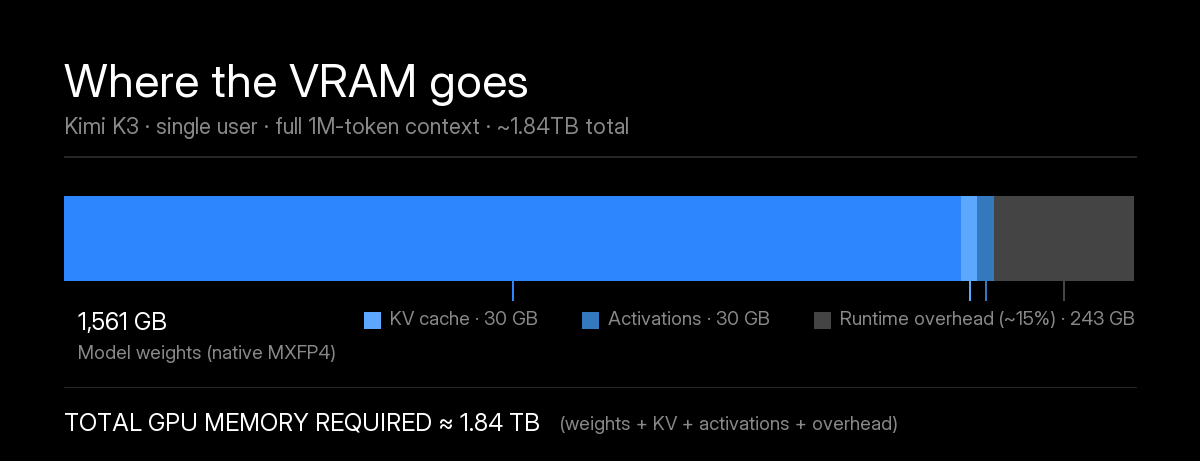
Three things jump out of the math:
- The weights are 85%+ of the bill at any context length. This is why “I’ll just use a shorter context” doesn’t rescue an undersized node — the floor is ~1.56TB no matter what.
- The KV cache is shockingly small for a 1M-token model. That’s the KDA (Kimi Delta Attention) + Gated MLA architecture doing its job: KV grows sub-linearly instead of exploding quadratically. A dense-attention 2.8T model at 1M context would need hundreds of GB per user.
- Concurrency is the hidden multiplier. One full-context user costs ~29.5GB of KV; fifty concurrent users at 256K each cost ~375GB more. Production sizing is about aggregate KV headroom, which is why Moonshot’s guidance jumps straight to supernode territory.
Independent calculators land in the same band: roughly 1,796GB at 8K and 1,829GB at the full window, and vLLM’s own engineering notes put a practical serving footprint at ~1.68TB in optimized configs. Treat all of these as planning numbers with ±10% error bars — the serving stack for a week-old model is still being tuned.
Why “104B active parameters” doesn’t save your VRAM
This is the single most common misconception, so it deserves its own section. Yes, Kimi K3 activates only ~104B parameters per token — 16 routed experts out of 896, plus 2 shared experts. No, that does not mean the model fits in 104B worth of memory.
The router can pick any 16 experts for each token. That means all 896 experts must be addressable in fast memory at all times. Sparsity reduces the FLOPs you pay per generated token; it does nothing to reduce the bytes you must store. The only way to leave experts out of HBM is disk or RAM offloading — which reintroduces a latency tax measured in seconds to tens of seconds per token, not milliseconds (the 8GB-RAM streaming demo clocks roughly 26–33 s/token). Sixteen active experts out of 896 is a speed story, not a fit story.
Which GPUs can actually run Kimi K3
Here is the configuration table that matters, built from vLLM’s engineering write-up, SGLang’s post-release serving recipes, AMD’s day-one verification, and Artificial Analysis’s July 30 hardware note. The bar to clear: 1.56TB of weights, plus KV and overhead — call it ≥1.7TB of usable HBM for a real deployment.
| Configuration | Total VRAM | Fits K3? | Reality check |
|---|---|---|---|
| 1× any single GPU (24–288GB) | ≤288GB | ❌ | Off by 6–65×. Not a discussion. |
| 8× H100 80GB (1 node) | 640GB | ❌ | Weights alone are 2.4× your total memory |
| 16× H100 (2 nodes) | 1.28TB | ❌ | Still short of the weights themselves |
| 32× H100 (4 nodes) | 2.56TB | ⚠️ | SGLang recipe exists, but Hopper can’t run MXFP4 natively — you keep the memory savings and lose the speed |
| 8× H200 141GB (1 node) | 1.13TB | ❌ | The painful “so close” — still 400GB short of weights |
| 16× H200 (2 nodes) | 2.25TB | ✅ | Works; same Hopper dequantization caveat |
| 8× B200 180GB (1 node) | 1.44TB | ❌ | 120GB short. The most expensive almost in AI right now |
| 16× B200 / GB200 (2 nodes) | 2.88TB | ✅ | Reference Blackwell config, MXFP4 native |
| 8× B300 / GB300 (DGX B300) | 2.30TB | ✅ | vLLM: full model “barely fits” in one node — the clean day-0 path |
| 8× AMD MI350X / MI355X | 2.30TB | ✅ | AMD-verified on release day at 16K context; cheapest verified entry |
| 64+ accelerators (supernode) | 18TB+ | ✅✅ | Moonshot’s production guidance — this is for serving at scale, not for “does it boot” |
| Mac Studio, 512GB unified | 512GB | ❌ | Not even at 2-bit, per community testers |
| RTX 4090 / 5090 (24–32GB) | 24–32GB | ❌ | You’d need ~75 consumer cards just to hold the weights |
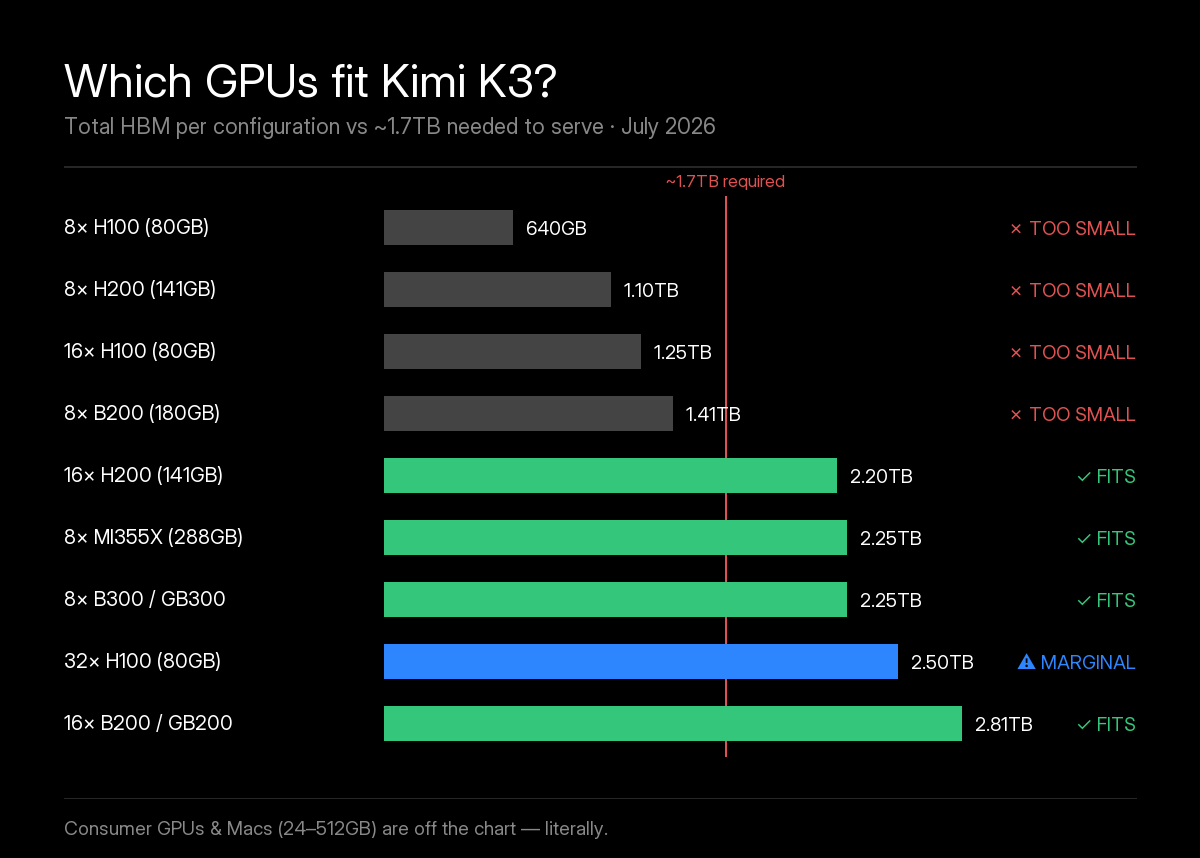
The pattern to notice: this is a Blackwell-and-newer / MI350-and-newer model. K3 was quantization-aware trained in MXFP4 from the SFT stage, and only NVIDIA Blackwell (B200/B300/GB200/GB300) and AMD MI350/MI400-class silicon execute MXFP4 natively. Hopper-generation cards (H100/H200) and MI300X can load 4-bit weights but must dequantize at runtime — you keep the memory savings and lose most of the speed advantage that makes K3 economics work. If you’re planning hardware, plan around B300/MI355X-class nodes or don’t plan at all.
The consumer hardware reality: RTX 4090, Mac, Ollama and GGUF
Every open-weight release spawns the same three questions. The answers, bluntly:
“Can I run Kimi K3 on my RTX 4090?” No. Weights alone are ~1,561GB; your card has 24GB. You would need roughly 75 RTX 4090s just to store the model — at which point you’ve built a very inefficient datacenter. This is not a quantization problem: the published weights are already native 4-bit, trained that way. Unsloth’s community GGUFs run from 466GB (1-bit) to 861GB (2-bit XL), and the 1-bit builds keep only about 79% top-1 agreement with the full model. There is no slider you can drag that gets 2.8T parameters into a gaming PC.
“What about a Mac Studio with 512GB?” No. Unified memory is wonderful for 70B–120B-class models; it holds less than a third of K3’s weights. Community testers were blunt: not even at 2-bit.
“When Ollama / GGUF?” GGUFs exist now, but not in any useful form for a normal PC. Unsloth publishes Kimi K3 GGUFs from ~466GB (1-bit) up to 1.56TB (8-bit, lossless), so even the smallest build needs roughly half a terabyte of combined RAM and VRAM; a 1-bit build measured about 0.10 tok/s on a 4×A100 server with 2TB of RAM (per ComputingForGeeks). Disk-streaming goes further down the memory ladder: the open-source kimi-k3-in-c engine runs the full checkpoint in ~8GB of RAM at a measured ~26–33 seconds per token (we break it down in Kimi K3 on 8GB RAM). Both are science exhibits, not chat products. What will arrive, and what is genuinely worth waiting for, is the wave of K3-distilled smaller models: fine-tunes and distillations that inherit K3’s coding and agentic behavior at 30B–120B sizes that actually fit on local hardware. That’s exactly what happened after DeepSeek R1, and it’s the real gift open weights give the local-AI community.
If you searched “kimi k3 ollama” hoping for a ollama run one-liner, the honest 2026 answer is: use the Kimi app or the API today, and watch the distillation scene over the next months.
What self-hosting actually costs
Owning the hardware to run K3 is a capital decision, not a hobby one. Current street numbers, converted and rounded — treat them as order-of-magnitude planning figures, not quotes:
| Path | Upfront cost | Ongoing | Verdict |
|---|---|---|---|
| 8× MI355X server (cheapest verified) | ~$250K–$350K | Power + ops | Entry ticket for serious self-hosting |
| 16× B200 across 2 nodes | ~$700K–$900K class | Power + networking + ops | NVIDIA reference path |
| 64+ accelerator supernode (Moonshot production guidance) | ~$1.9M–$2.7M hardware | ~100kW draw; ~$110K–$140K/yr electricity alone | For serving K3 as a business |
| Equivalent cloud GPU rental | — | Can exceed ~$1.2M/yr for always-on capacity | Only makes sense for bounded pilots |
| Official API | $0 | $0.30 / $3 / $15 per 1M tokens | The correct choice for ~99% of users |
And the hidden costs don’t show in the table: multi-node MoE serving is a genuinely hard ops problem (expert-parallel sharding, KDA-aware prefix caching, failure domains across nodes), which means at least one engineer who owns the pager. Artificial Analysis’s summary of capable configs — “hundreds of thousands of dollars” — is the floor, not the ceiling.
API vs self-host: the break-even math
Run the numbers once and the decision usually makes itself. Moonshot’s API pricing is $0.30 per million cache-hit input tokens, $3.00 standard input, $15.00 output, flat across the 1M window — and Mooncake’s prefix caching reportedly delivers 90%+ cache-hit rates in real coding workloads.
Take a heavy coding-agent team burning, every month:
- ~500M input tokens, mostly cache-hit → 500 × $0.30 ≈ $150
- ~50M output tokens → 50 × $15 ≈ $750
- Total: ~$900/month
Against that, a cheapest-case self-host node at $300K plus, say, $5K/month in power, bandwidth and ops amortization: break-even is over six years — assuming zero hardware failures, zero price cuts (there will be price cuts), and that your volume never dips. Even at 10× that API volume, you’re years from break-even, and you’re paying an ops engineer out of the difference the whole way.
Self-hosting wins only when one of these is true: sustained massive volume (billions of tokens daily, where per-token cost dominates everything), compliance/air-gap requirements (regulated data that cannot leave your VPC), or research (fine-tuning, interpretability, distillation — where the weights themselves are the point). Everyone else is buying a cluster to impress people on the internet.
Who should self-host — and who shouldn’t
| Your situation | The right move | The wrong move |
|---|---|---|
| Developer who wants K3 quality today | Kimi app or API — kimi-k3 model ID | Waiting for a “local build” that isn’t coming |
| Team shipping an agent in production | Official API or a hosted provider (Together AI, Fireworks, OpenRouter) | Buying a half-cluster “because open” |
| Startup with spiky, growing volume | API with aggressive prefix caching; revisit quarterly | CapEx sized to your peak fantasy |
| Enterprise with data-residency / air-gap rules | Self-host on 8×B300/MI355X-class nodes, or certified private inference | Sending regulated data to any public endpoint |
| Research lab (fine-tune, distill, interpret) | Download the official weights, read the Kimi K3 License first | Assuming “open weights” means unrestricted MIT |
| Founder who heard “open = free forever” | Budget tokens; prototype on the API (unlocks after a $1 top-up) | Getting a quote for 8×B300 “to save money this month” |
Myths that are still burning people
| Myth | Reality, September 2026 |
|---|---|
| ”Open weights = free infinite local chat” | Weights are free to download under the Kimi K3 License. GPUs, power and ops are not free. |
”I’ll ollama pull it like a Llama” | The smallest GGUF is ~466GB and crawls at ~0.1 tok/s even on a 2TB-RAM server. Watch for distilled descendants instead. |
| ”8×H100 works — it runs every open model” | 640GB total vs 1,561GB weights. It ran every previous open model. |
| ”8×B200 is enough, it has over a terabyte” | 1.44TB < 1.56TB weights. You need 16×B200 — two nodes, double the money. |
| ”Self-hosting is always cheaper than $3/$15” | Only at sustained billions-of-tokens volume with an ops team already on payroll. |
| ”1M context is free once you own the box” | Every concurrent full-context user adds ~30GB of KV cache. Concurrency is its own bill. |
| ”The 594GB download I read about fits my plan” | That was a pre-release estimate. The measured checkpoint is 1.56TB. Re-plan. |
Try Kimi K3 today — no GPU required
If this article saved you from a six-figure hardware mistake, here’s the two-minute path to actually using the model:
- Chat: kimi.com and the Kimi app have a free tier for trying Kimi, but confirmed K3 access (and the full 1M context) comes with a paid plan (Plus and up).
- Developers: hit the API (
kimi-k3, OpenAI/Anthropic-compatible) via platform.kimi.ai, or use Kimi Code CLI and pick K3 with/model(see our Kimi Code K3 setup guide). Setreasoning_effortto match the task —lowfor cheap iteration,maxfor hard problems. - Production without CapEx: Together AI committed to serverless K3 on day 0, Fireworks and OpenRouter host endpoints, and Amazon Bedrock has offered K3 since September 18 — Western infrastructure, no cluster, per-token billing (full list in our API providers guide).
FAQ
How much VRAM does Kimi K3 need?
Plan for roughly 1.6–1.84TB of GPU memory. The released MXFP4 weights measure 1,561GB on disk, and serving adds KV cache (about 0.7GB per user at 8K context, up to ~29.5GB at the full 1M window), roughly 30GB of activations, and around 15% runtime overhead. Independent calculators land at ~1,796GB for short contexts and ~1,829GB at full context.
Can I run Kimi K3 on an RTX 4090 or any consumer GPU?
No — and not by a small margin. A 24GB card would need roughly 75 of them just to hold the 1.56TB weights, before any KV cache. This is not a quantization problem: the published weights are already native 4-bit. If you want a local model on a consumer card, you need a smaller model; for K3, use the Kimi app or the API.
What is the cheapest GPU setup that can run Kimi K3?
The cheapest verified config is an 8×AMD MI355X server (2.3TB total HBM), confirmed by AMD on release day, at an estimated $250,000–$350,000. On the NVIDIA side, a single DGX B300 (8×288GB) barely fits per vLLM’s engineering write-up, while B200-generation hardware needs 16 GPUs across two nodes. Moonshot’s own production guidance recommends 64+ accelerators in a supernode.
Can I run Kimi K3 on a Mac or Mac Studio?
Not usefully. Even a fully maxed 512GB Mac Studio holds less than a third of the full weights, and it cannot fit a 2-bit build (Unsloth’s 2-bit XL GGUF is 861GB). The smallest 1-bit GGUF (466GB) squeezes under that ceiling with almost no headroom and a real accuracy loss, and disk-streaming engines only run the full checkpoint at seconds to tens of seconds per token. Apple Silicon unified memory is excellent for 70B–120B-class models, but a 2.8-trillion-parameter MoE is a different category entirely. On a Mac, reach K3 through the Kimi app or API.
Does Kimi K3 work with Ollama or GGUF?
Not in any practical way. Unsloth now publishes Kimi K3 GGUFs, but they range from about 466GB (1-bit) to 1.56TB (8-bit, lossless), so even the smallest needs roughly half a terabyte of combined RAM and VRAM, and a 1-bit build measured around 0.10 tokens per second on a 4x A100 server with 2TB of RAM. Disk-streaming engines such as kimi-k3-in-c can run the full checkpoint in about 8GB of RAM, but at a measured 26–33 seconds per token. Both are curiosities, not chat products. Watch for K3-distilled smaller models instead — that is where open weights will actually pay off for local users.
Is it cheaper to self-host Kimi K3 or use the API?
For almost everyone, the API — by years. A realistic self-host node costs $250K+ upfront plus power and ops, while the official API charges $0.30 per million cache-hit input tokens, $3 standard input and $15 output. A heavy coding-agent team burning ~550M tokens a month pays roughly $900/month on the API; the self-host break-even stretches past six years at that volume. Self-hosting only wins at sustained massive volume, or when compliance, air-gapping or research requirements force it.
How much memory does Kimi K3’s 1M context window need?
About 1.84TB in total: 1,561GB of weights, roughly 29.5GB of KV cache for a single user at the full 1,048,576-token window (16-bit), ~30GB of activations, and ~15% runtime overhead. Thanks to the KDA + Gated MLA attention stack, KV cache grows sub-linearly with context — but every additional concurrent user adds their own KV allocation, which is why production sizing starts at 2TB+ of HBM.
Why does Kimi K3 need 1.5TB of VRAM when only 104B parameters are active per token?
Because sparsity saves compute, not memory. All 896 routed experts (plus 2 shared experts) must be addressable in memory so the router can pick any 16 of them per token. The 104B active figure reduces FLOPs per step — it does not shrink the 2.8T parameters you have to store. There is no MoE trick that lets you leave most of the model on disk without paying a brutal latency tax.
The bottom line
Kimi K3’s VRAM requirements are the story of open weights growing up. A 1.56TB checkpoint that barely fits in a single DGX B300, needs 16 GPUs on B200-generation hardware, and laughs at every consumer card ever made — while serving an entire user at 1M context for under 30GB of KV cache. Both things are true at once: K3 is the most capable model you can download for free, and almost nobody should run it themselves.
The winning move for nearly every reader is boring and correct: use the API at $0.30/$3/$15, cache aggressively, and let Moonshot’s supernodes carry the 1.8TB. Buy hardware when the workload — compliance, sustained billions-token volume, or research that needs the weights — demands it, not the hype.
Keep reading: the Kimi K3 open weights release breakdown, the full Kimi K3 specifications, the complete Kimi K3 guide, our Kimi K3 download for PC walkthrough, and the head-to-heads — K3 vs Claude Fable 5, K3 vs GPT-5.6 and K3 vs GLM-5.2.